Booking a Bangladesh Railway ticket used to mean waking up before sunrise, rushing to the station, and standing in a queue that barely moved. That is not the case anymore. Today, anyone with a phone or computer and a stable internet connection can book a train ticket in minutes through the official e-ticket system or the Rail Sheba app.
Our website walks you through the entire Bangladesh Railway ticket booking process from beginning to end. It covers what you need before you start, every step of booking a train ticket online, how to use the Rail Sheba app, what to do if something goes wrong, and answers to the questions travelers ask most often. By the end, you will be able to book your own e ticket confidently, without needing help from anyone else.
Why Book Your Train Tickets Online
Booking a train ticket online offers several clear benefits compared with visiting the station counter:
- Save your time: Complete the entire Bangladesh Railway Train Ticket booking process from home in just a few minutes instead of spending hours waiting in line.
- Compare trains easily: View all available trains for your route and travel date on one screen, along with fares and seat availability.
- Get instant confirmation: Your e-ticket is generated as soon as your payment is successful, so you don’t need to visit the station in advance to collect a paper ticket.
- Check seat availability: Avoid the risk of arriving to find the counter fully booked. Online seat availability updates in real time, allowing you to see which seats are still available.
- Track your train: Use the Rail Sheba app’s or use official web’s live train tracking feature to check your train’s location and know when it is approaching your station.
What You Need Before Train Ticket Booking
Before you start booking your Bangladesh Railway ticket online, make sure you have these things ready. Having everything ready beforehand makes the booking process much easier, especially when tickets are in high demand.
- Mobile number and email: Use a mobile number and email address that you can access, as you may need them for verification and booking updates.
- National ID or passport: Bangladeshi passengers will need their National ID number. Foreign travelers may need to provide their passport number.
- Payment method: Keep a payment option ready for online payment, such as bKash, Nagad, Rocket, Upay, or a Visa or Mastercard debit or credit card.
- Travel information: Decide your departure station, destination, travel date, and preferred seat class before you begin. Common classes include Shovan, S Chair, Snigdha, and AC Seat.
- Internet connection: Make sure you have a stable internet connection. This is particularly important during busy periods like Eid and public holidays, when tickets can sell out quickly.
A mobile number, email address, and National ID are usually required when creating your account. If you already have a registered account, you don’t need to provide these details again when booking a ticket.
Bangladesh Railway Ticket Booking Online Step-by-Step
Booking a Bangladesh Railway ticket online is fairly simple once you know the process. There are two main sources for booking the tickets online, the official website and Rail Sheba app. The steps are almost the same: choose your route and train, select a seat, and complete payment. Here’s a step-by-step guide to help you through the whole process.
Step 1: Open the Ticket Booking Platform
First, choose where you want to book from. You have three common options.
- Using the Official Website
- Using the Rail Sheba Mobile App
- Using a Third Part Booking Site (Our Website)
Using the Official Website
Go to the official Bangladesh Railway e ticket portal in your browser. or follow this link – https://eticket.railway.gov.bd/. This is the primary system where all bookings are ultimately processed, whether you start on this site directly or arrive here through a partner platform. But you don’t need to visit on this website you can directly search your train routes and Book tickets directly form this website.
Using the Rail Sheba Mobile App
Download Rail Sheba from the Google Play Store (Android) or the Apple App Store (iOS). Install it and open the app to access the same booking system in a mobile-friendly format.
Using a Partner or Third Party Booking Site
Some travelers prefer using a partner platform that routes them into the same official booking system. This can be convenient if you are already browsing travel information and want to jump straight into ticket search without switching apps.
Once you choose your platform, enter your trip details.
Step 2: Search for Available Trains
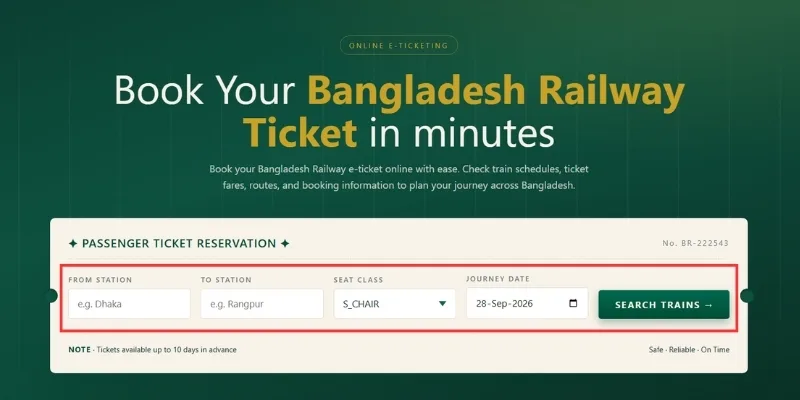
Once the Bangladesh Railway ticket booking portal opens, the next step is to look for trains based on your travel plans. Here, enter your starting station and destination, select your travel date and class, then search for trains. The trains will appear, and you will select the one that suits you best.
Enter Your Departure and Destination Station
Type in the station you are traveling from and the station you are traveling to. Bangladesh Railway system usually suggests matching station names as you type, which helps prevent spelling mistakes.
Choose Your Preferred Class
Pick the seat class that matches your budget and comfort preference, such as Shovan, S Chair, Snigdha, AC Seat, or AC Berth for overnight journeys.
Select Your Travel Date
Choose the date you plan to travel. Keep in mind that tickets typically open for booking around ten days before the journey date, so if your date is too far in the future, you may need to wait until booking opens for that day.
Click Search Trains
Once all details are entered, click the search button. The system will display a list of trains on your selected route, along with departure times, journey duration, and remaining seats in each class.
Step 3: Log In or Create Your Account
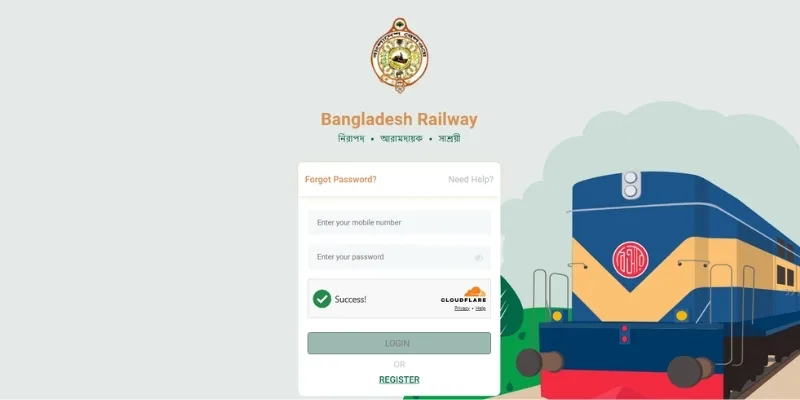
Now, you need to login or Register in Bangladesh Railway ticket Portal. If you have already have an account login with your mobile number and password. If you don’t have any account create an account for book Bangladesh Railway Train Ticket.
Logging In as a Returning User
If you already have an account, enter your registered mobile number or email address along with your password, or complete the one-time password verification if that option is enabled.
Registering as a New User
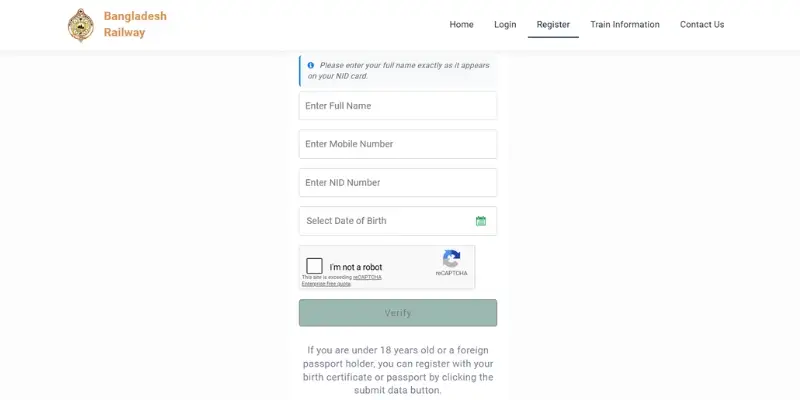
If this is your first booking, click Register and fill in your full name, mobile number, email address, and your National ID or passport number. After submitting, you will usually receive a verification code by SMS or email that you need to enter to activate your account.
Keep your login details saved somewhere safe, since you will use the same account for future bookings, ticket history, and refund requests.
Step 4: Choose Your Train, Coach, and Seat
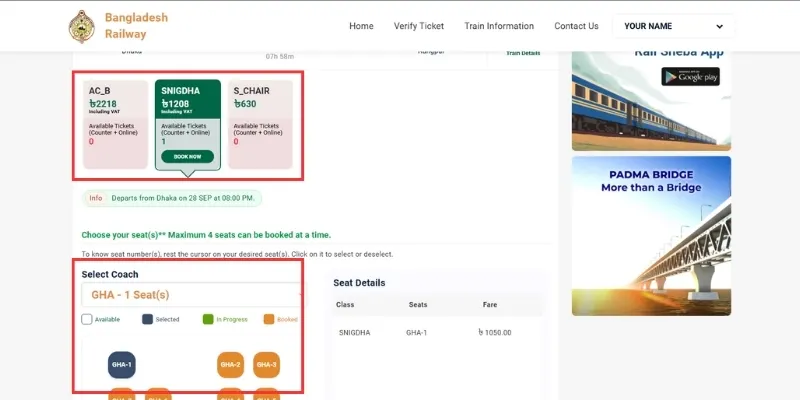
Once you have searched for available trains, select the one that suits your journey. Before choosing, consider the time, cost, available classes, and seats. If you are traveling in a group, you can also check whether seats are available next to each other.
Select Coach and Seat
Click on your preferred train and choose the coach class. If a seat map is shown, you can pick specific seats, which is especially useful if you are traveling with family and want everyone seated together.
Enter Passenger Details (if required)
Fill in the names and other required details for each passenger included in the booking. Double-check the spelling of names, since this information appears on the final ticket.
Step 5: Complete Payment
After selecting your train and seats, pay for your ticket. Carefully check the fare and passenger details before paying. Once you complete the payment successfully, your booking should be confirmed, and your e-ticket will be available.
Choose Your Payment Method
Select from the available payment options, which usually include mobile financial services such as bKash, Nagad, Rocket, and Upay, as well as debit and credit cards such as Visa, Mastercard, and DBBL Nexus.
Confirm the Fare
Review the total fare, including any service charges, before proceeding. Make sure the number of passengers and the class selected match what you intended to book.
Authorize the Transaction
Depending on your payment method, you may need to enter a PIN, approve the payment in your mobile banking app, or enter your card details along with a one-time password sent by your bank.
Step 6: Download and Save Your E-Ticket
Once payment is successful, your e ticket is generated automatically. A copy is sent to your registered email, and it is also available for download from the purchase history section of your account.
Download the ticket as a PDF or take a screenshot, and save a copy on your phone in case you don’t have internet access on travel day. If you prefer a physical copy, you can print it at home before heading to the station.
Troubleshooting Common Issues
In some cases, you might face problems when booking a train ticket online. Most of these problems involve payment, login, or technical errors on the website. However, before proceeding, check whether your booking has already been completed, either by payment or by ticket issuance.
Payment Failed, But Money Was Deducted
This can happen because of a network delay between your bank and the Bangladesh Railway ticketing system. Wait around thirty minutes and check your purchase history, since the ticket may still be issued. If it is not, the amount is usually reversed automatically within a few business days.
Unable to Log In
Double-check that you are using the correct mobile number or email associated with your account. If you forgot your Bangladesh Railway portal account password, use the reset password option, which will send a recovery link or code to your registered contact information.
No Seats Available on Preferred Train
Try checking a nearby time slot or a different class on the same train. During peak seasons such as Eid, seats are claimed quickly after booking opens, so logging in a few minutes early can help.
Verification Code Not Received
Check that you entered the correct mobile number or email during registration. Sometimes SMS delivery is delayed due to network congestion, so wait a few minutes before requesting the code again rather than requesting it repeatedly.
Website or App Running Slowly
This usually happens during high traffic periods. Try refreshing the page, switching between the Bangladesh Railway Website and the app, or attempting your booking during a less busy time of day if your travel date allows flexibility.
Frequently Asked Questions
Can I change my ticket after booking?
In most cases, minor changes such as date adjustments are possible before the journey date, though this depends on the specific fare rules attached to your ticket class.
What if I lose my ticket?
Since your e-ticket is linked to your Bangladesh Railway account, you can log back in at any time and download another copy from your purchase history section.
What happens if I travel without a ticket?
Traveling without a valid ticket can result in a penalty fare or being required to purchase one immediately from railway staff on board.
Can I book group tickets online?
Yes, most bookings allow multiple passengers in a single transaction, which is convenient for families or groups traveling together on the same train.
Can I get a refund for my ticket?
Refunds are generally available depending on how far in advance you cancel, and the exact refund percentage is shown during the cancellation process.
Do I need to print my e ticket?
Printing is optional in most cases, since a digital copy on your phone is usually accepted, but carrying a printed copy is a good backup in case your phone battery runs low.
Is online booking available for local and commuter trains?
Local and commuter tickets are typically sold at the station a few hours before departure rather than through advance online booking, so plan accordingly if you are taking a short local route.
Conclusion and Next Steps
Booking a Bangladesh Railway ticket online is no longer complicated once you understand the steps involved. From searching for your train and logging into your account to selecting your seat and completing payment, the process is designed to take minutes, not hours.
If you are booking for the first time, create your account today so it is ready before your next trip. If you already have an account, consider installing the Rail Sheba app for faster access and live train tracking on future journeys. If you are planning to travel during a busy season, log in and book as early as your travel date allows, since popular routes and classes tend to fill up quickly.
With a little preparation, your next train journey across Bangladesh can start with a smooth booking experience and end with a comfortable ride to your destination.